Business Card Website
What Is a Business Card Website?
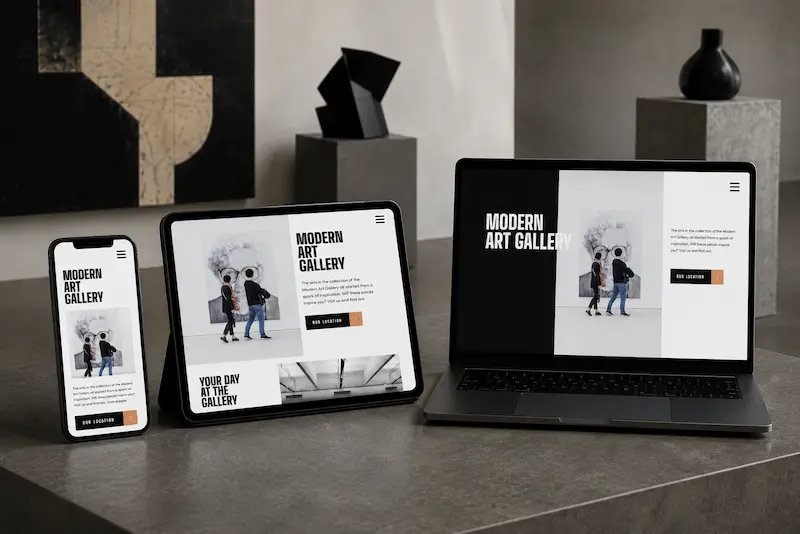
A business card website is a small website consisting of several pages that clearly introduces a company, entrepreneur, or professional. It explains what they do, which services they offer, and how potential customers can contact them. Unlike an online store, it does not focus on shopping cart purchases, and unlike a landing page, it is not built around a single action. Its purpose is to give visitors enough information to decide whether to get in touch.
The structure depends on the business, but the essential pages are usually the same: Home, Services, About Us, and Contact. Depending on the company's needs, additional pages may include Pricing, Portfolio, or Testimonials. The main principle is that each page should answer a specific question rather than repeat information visitors have already seen.
The homepage acts as the first introduction to the business. Within a few seconds, visitors should understand what the company does, who it serves, and what they can do next. That is why the homepage typically includes a brief business description, main services, key advantages, and a prominent contact button. More detailed information belongs on dedicated pages, while the homepage guides visitors toward the relevant sections.
The Services page explains exactly what the company offers, which problems each service solves, what the work involves, how the process works, and what results customers can expect. If a business provides several distinct services, creating a separate page for each is usually worthwhile. This makes it easier for visitors to find relevant information and helps search engines understand which queries each page addresses. For example, a cleaning company might have dedicated pages for deep cleaning, window cleaning, and post-renovation cleaning.
The About Us page addresses one of the biggest concerns customers have before making contact: who am I trusting with my money and my project? Concrete facts matter here, such as how long the company has been operating, who performs the work, which materials or methods are used, and what certifications or completed projects demonstrate its expertise. Authentic team photographs and customer reviews build more trust than generic claims about high quality and personalized service.
Prices should be displayed whenever possible. If a service has a fixed price, a straightforward price list may be enough. If the cost depends on the scope or complexity of the work, provide a starting price and explain what affects the final amount. Visitors who can estimate the budget are better prepared to make an inquiry, and the company spends less time answering the same pricing questions.
The Contact page usually includes a phone number, email address, messaging options, contact form, business hours, and a physical address if customers can visit in person. Local businesses may also include a map and service area. Contact details should match the information provided in Google Business Profile and on social media. The main contact options should also remain easy to find throughout the website, such as in the header or footer.
There are also technical essentials that help even the best content perform effectively. A website must be easy to use on mobile devices because Google primarily uses the mobile version of a site's content for indexing. It should also load quickly, use clear headings, and have analytics configured so the business can understand where visitors come from and how they interact with the site. These are important foundations for future search engine optimization.
If you are planning to create a business card website , this format is particularly suitable for small businesses, independent professionals, and companies offering a limited range of services. If your goal is to promote a single offer, a landing page may be more effective. For companies with multiple business areas, a team, case studies, and a blog, it may be better to consider corporate website development . Not sure which format is right for you? Start by analyzing your market and competitors so the website structure supports your business goals from the beginning.
In summary, a business card website is a small but carefully structured website in which every page serves a specific purpose. The homepage introduces the business, service pages explain what is offered, the About Us section builds trust, pricing information helps visitors estimate their budget, and contact details make it easy to get in touch.
Business Card Website Examples
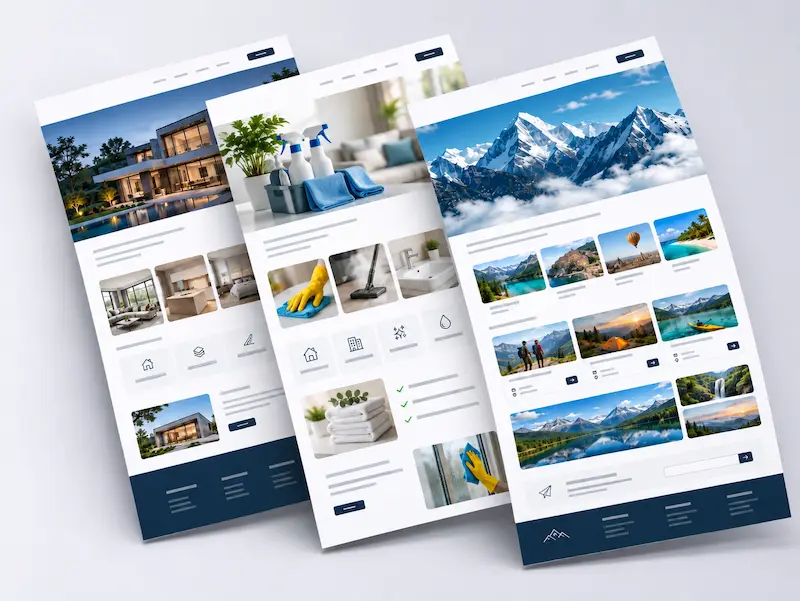
Two business card websites may have the same number of pages yet influence customer decisions in completely different ways. Someone looking for a lawyer will primarily consider specialization, experience, and qualifications. A potential client searching for a psychologist wants to understand the professional's approach, feel confident in their expertise, and learn about consultation arrangements. Someone looking for cleaning services, on the other hand, wants to quickly find available services, estimated prices, and a convenient way to place an order.
That is why judging a business card website solely by its appearance is a mistake. Attractive photographs, modern typography, and animations cannot compensate for missing information. It is far more useful to consider how quickly visitors can find answers to their questions, whether the website provides evidence of professional expertise, and whether they understand what happens after submitting an inquiry.
Below, we will examine three business card website examples from different industries. For each one, we will identify the elements that deserve the most attention, the features that help establish trust, and the design decisions that may prevent visitors from becoming customers. The goal is not simply to gather ideas for your own website, but to understand which approaches genuinely suit your business.
Cleaning Company Website

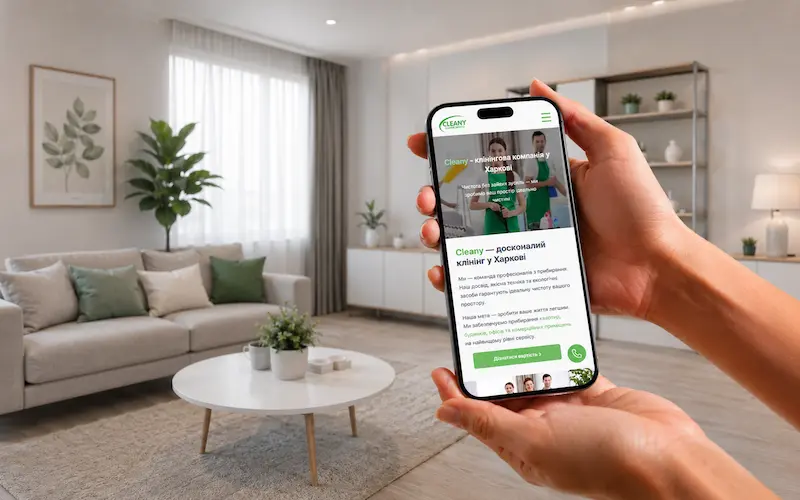
Let's look at a real example: the cleaning company website for Cleany, a business providing residential and office cleaning services in Kharkiv. The website does much more than introduce the company and display contact information. Visitors can explore specific services, check estimated prices, use an online cost calculator, or request a personalized quote. This turns a relatively small website into a practical business tool rather than a simple online introduction.
The homepage presents the company's main services, including house and apartment cleaning, deep cleaning, regular maintenance cleaning, post-renovation cleaning, window cleaning, upholstery cleaning, and office cleaning. Each service has its own dedicated page, and for good reason: someone searching for window cleaning expects different information from a customer who needs a property cleaned after construction work. These dedicated pages explain the scope of work, service conditions, and pricing while helping search engines understand the purpose of each page.
The distinction between deep cleaning and post-renovation cleaning is particularly important. These services involve different cleaning methods, types of dirt, and pricing structures. Each has a detailed description of the work involved and estimated prices for apartments of different sizes. This allows customers to choose the right service with a clear understanding of what they are ordering, while the company receives better-informed inquiries.
One of the website's most useful features is a dedicated pricing calculator page offering two ways to request an estimate. The first is an inquiry form where customers provide their name, property size, cleaning type, level of dirt, phone number, preferred contact method, and any additional details. This gives the manager the information needed to prepare a personalized quote without repeatedly asking the same questions.
The second option is an online calculator. It allows customers to estimate the cost based on property size, cleaning type, and additional tasks, such as cleaning the inside of a refrigerator or oven. The result is clearly presented as a preliminary estimate rather than a guaranteed final price. The actual cost is confirmed after discussing the property's condition and the required work. This combines the convenience of an automated estimate with the accuracy of a personalized assessment.
The website also has a separate pricing page where visitors can compare rates for standard cleaning, deep cleaning, regular maintenance cleaning, and post-renovation cleaning. Estimated prices are provided for different apartment sizes, along with explanations of the factors affecting the final cost. This page remains valuable even with an online calculator: visitors can first understand the general price range and then calculate an estimate for their particular needs.
Trust is built through specific information rather than exaggerated claims. The website includes a section about professional KIEHL cleaning products and Kärcher equipment, explaining what the company uses and why these products and tools are appropriate for different surfaces. Service pages describe the work in detail, while the FAQ section addresses practical concerns, such as whether customers need to be home during cleaning, how prices are calculated, and whether regular cleaning services are available.
The customer journey is also carefully designed. Pricing buttons appear on service pages, while phone and messaging options are available for quick communication. Visitors can choose the approach that suits them best: review the price list, use the calculator, or contact a manager directly. This flexibility is important for service businesses because some customers prefer discussing their needs over the phone, while others want to estimate their budget independently before reaching out.
The results are worth highlighting. The website took one month to develop, followed by another six months of SEO work to reach leading positions in local search results in Kharkiv. Today, it generates inquiries every day. During busy periods, when demand exceeds the company's capacity, Cleany can choose which orders to accept. For a service business, this is the real value of an effective website: customers find the company rather than the company having to constantly search for customers.
Cleany demonstrates how a small service business website can deliver much more than an online company profile. Dedicated pages explain the services, pricing information helps visitors understand the costs, the calculator provides preliminary estimates, and the inquiry form collects the details needed for accurate quotes. The website works continuously, attracting customers and giving the company greater control over its workload.
Lawyer Website
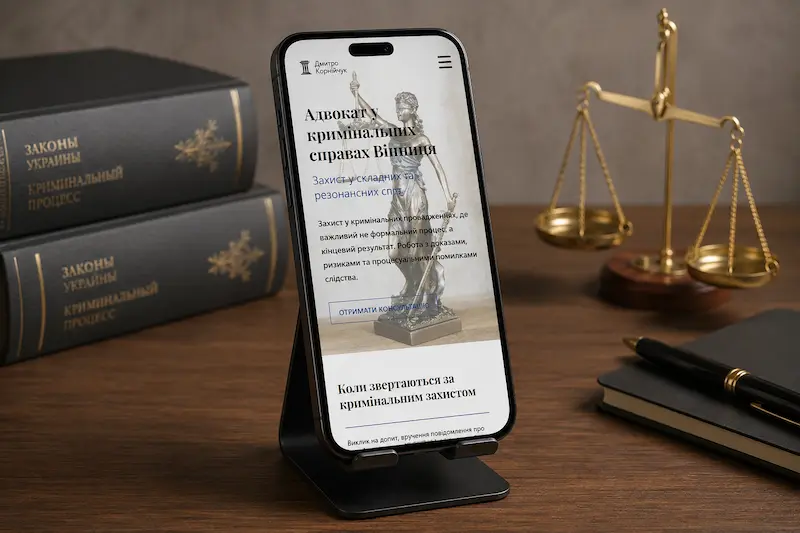
The website of lawyer Dmytro Korniichuk is a lawyer website development example that demonstrates how a personal professional website can introduce a specialist, explain legal services, and establish credibility through real cases. The homepage immediately makes the lawyer's areas of practice clear, including legal assistance, consultations, and courtroom representation in Vinnytsia. Visitors see his photograph, main practice areas, and a button to book a consultation.
Legal services are organized into separate practice areas, including criminal defense, legal support for businesses, and specialized cases. Each area has its own page explaining the situations in which legal assistance may be required. For example, the criminal defense page describes representation during interrogations, searches, pre-trial investigations, and court proceedings. This allows visitors to find information relevant to their legal problem without searching through a generic list of services.
The About Me page answers a question that matters greatly before contacting a lawyer: who will I be trusting with my case? It describes his professional career since 2013, including experience in government institutions, law firms, and private practice. The page also explains his working principles, confidentiality, consultation options, and the five stages of cooperation. Potential clients can understand how the process works before making their first inquiry.
One of the website's strongest features is the Expertise (Case Studies) section. It presents specific legal cases, outlining the circumstances, legal issues, actions taken, and outcomes. In the legal profession, this type of evidence is particularly persuasive. Instead of relying on general claims about experience and competence, visitors can see how the lawyer approaches real cases.
Getting in touch is straightforward. The Get a Consultation button opens a form requesting the visitor's name, phone number, and a description of the situation. The website also provides a telephone number, email address, and office locations in Vinnytsia and Kyiv. Visitors can first assess the lawyer's qualifications and services, then submit a specific legal inquiry.
This example demonstrates that a lawyer's website depends more on reputation, clear specialization, and proven experience than on decorative design elements. Service pages explain the main practice areas, case studies demonstrate professional results, and the consultation form helps turn initial interest into direct communication.
Barbershop Website
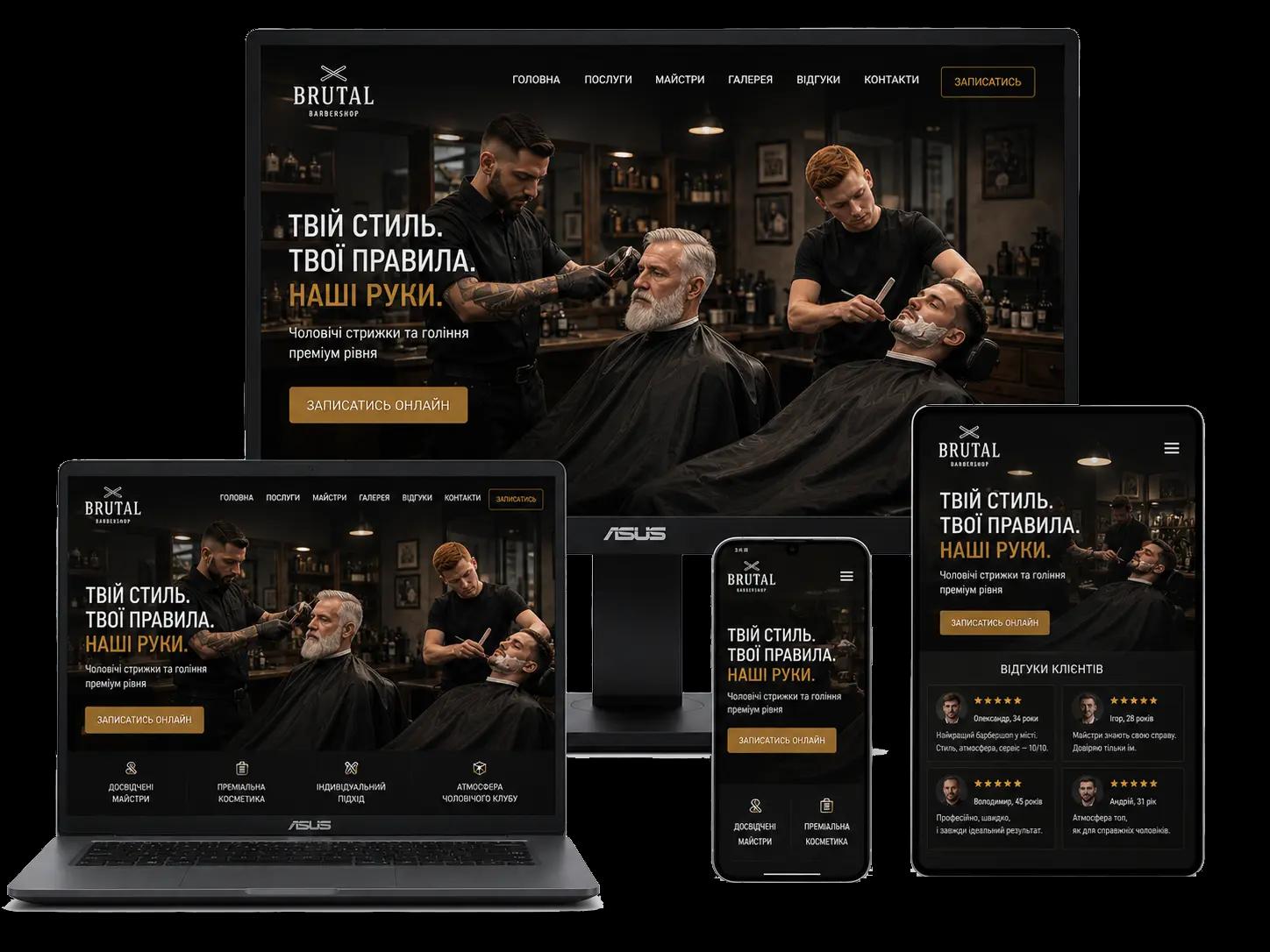
A barbershop website has two main goals: immediately communicate the atmosphere of the business and make it easy for customers to book an appointment. The first screen typically features an atmospheric photograph, the barbershop's name, a short description of its positioning, and a prominent booking button. Within seconds, visitors should understand the establishment's style, the services available, and how to book a barber.
The main navigation highlights essential sections such as Home, Services, Barbers, Gallery, Reviews, and Contact. This structure makes sense because customers usually want to answer three questions: what services are available, who provides them, and how can I book an appointment? The easier it is to find this information, the more likely visitors are to take the next step.
The services section should go beyond simply listing options such as men's haircuts or beard shaving. It should explain what each service includes, how long it takes, and how much it costs. Clear pricing is particularly important for barbershops because many customers want to know the expected cost before booking.
Another valuable feature is the team section. Customers often choose a particular barber rather than a barbershop itself. Photographs, brief descriptions of each barber's experience or style, and the option to book directly with a preferred professional help visitors make their decision more confidently.
The gallery and customer reviews also serve practical purposes. A gallery displays examples of previous work and helps visitors decide whether the barbershop's style matches their preferences. Reviews strengthen trust, especially when they show that the business has returning customers. For a local business, this can be just as important as pricing.
Mobile usability is especially important because many customers search for barbershops on their smartphones. The illustration shows how the layout adapts to different devices, keeping the booking button, essential services, and contact details accessible without unnecessary steps.
In short, a barbershop business card website is more than a digital introduction. It communicates the establishment's atmosphere, explains its services, introduces the barbers, and gives visitors a straightforward path to booking an appointment.
What to Prepare Before Building a Website
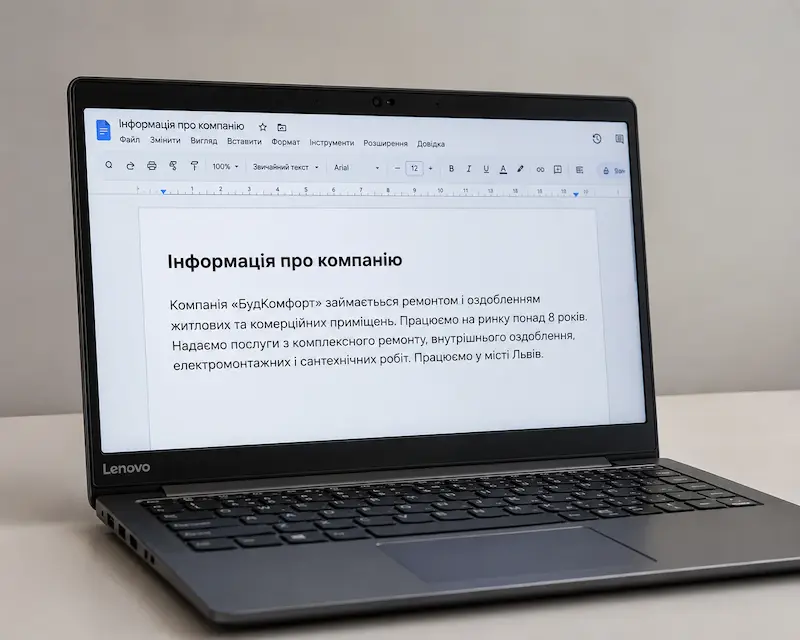
Even a small website project can be delayed when essential materials are missing. The designer waits for photographs, the developer needs approved content, and the client is still deciding which services to feature. Most of these delays can be avoided. You do not need a lengthy technical specification to get started. Preparing essential business information and defining what visitors should gain from the website is usually enough.
Start with a brief description of your company: what you do, how long you have been operating, which cities you serve, and who your customers are. Explain what sets you apart from competitors, whether it is your specialization, equipment, team experience, turnaround times, or service conditions. There is no need to invent advertising slogans. Real facts about your business provide a stronger foundation for convincing website content.
Next, prepare a list of services. For each one, briefly explain what you provide, who needs it, what is included in the price, and which factors affect the final cost. If your business offers many services, identify the main areas that generate the most orders or that you want to develop further. You do not need to write SEO content yourself. Accurate business information is enough for specialists to prepare effective page content.
Collect materials that demonstrate your experience, including photographs of completed work, project examples, certificates, qualifications, customer reviews, and information about your team. A lawyer can provide a professional biography and examples from legal practice. A barbershop can share photographs of its barbers and haircuts, while a cleaning company can show its equipment and completed work. Use authentic materials that you have permission to publish. Genuine photographs are usually more convincing than generic stock images.
If you already have a logo, brand colors, fonts, or brand guidelines, provide the original files. If you do not have an established visual identity, collect a few websites whose designs you like and explain what appeals to you, such as the colors, layout, photography, or navigation. This helps establish a visual direction without copying another company's website.
Do not forget your contact information: phone numbers, email addresses, messaging apps, physical address, business hours, and social media profiles. Decide in advance where inquiries should be delivered and who will handle them. If customers usually contact you through Telegram, a complicated form with numerous fields may be unnecessary. However, if preparing a quote requires details such as property size or service type, those fields should be planned from the beginning.
It is also useful to prepare a list of competitors you genuinely compete with for customers. This helps identify the questions your audience asks, how competing businesses present their services, and what information may be missing from their websites. However, your website structure should be based on your business goals and actual search demand, not simply copied from a competitor's navigation menu.
All this information can be collected in a single document or a short project brief. If some materials are not yet available, that is not a problem: content, page structure, and certain visual elements can be developed together with your website developer. What matters most is accurate business information and clear priorities. To understand what happens after the preparation stage and which decisions you will need to approve, read our guide to the stages of website development .
Website Builder vs. Custom Development
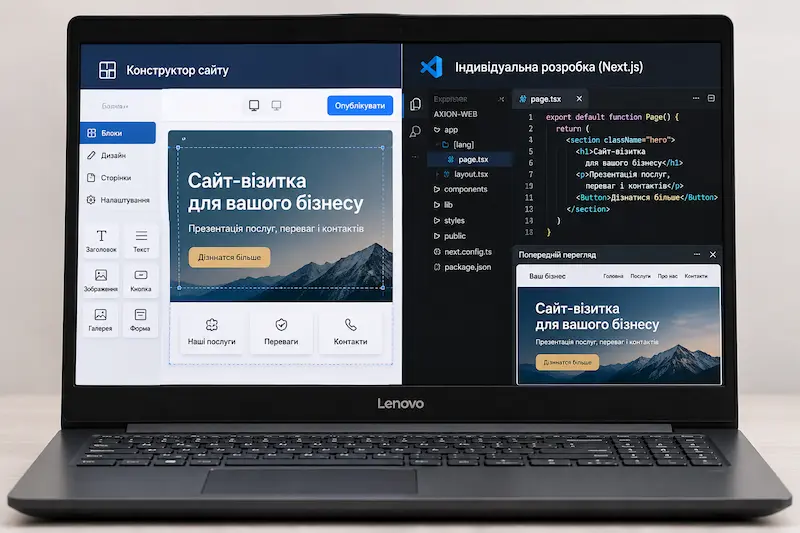
Once you have defined the website structure, the next question is whether to use a website builder or invest in custom development. Both approaches can produce a fully functional business card website, but they differ in cost, flexibility, technical limitations, and ongoing maintenance expenses. The right choice depends less on company size and more on what the website needs to accomplish.
Website builders such as Wix and Webflow allow users to create pages from ready-made components without programming. You can choose a template, adjust colors, add photographs and text, display contact details, and create inquiry forms. This is convenient for entrepreneurs who need a straightforward website with a few pages and want to edit its content themselves. The main advantages are quick setup, built-in tools, and visual editing.
However, the limitations of website builders may become more noticeable as a business grows. Not every template allows extensive structural changes, while unusual features may require paid extensions or a more expensive subscription. Before choosing a platform, check its SEO settings, loading performance, website migration options, and access to the underlying code. If your requirements eventually exceed the platform's capabilities, switching technologies may mean rebuilding the website.
Custom development is tailored to specific business requirements. The design, structure, navigation, and forms are not restricted by a predefined template. A cleaning company might need a custom pricing calculator, a barbershop might require online appointment booking, and a manufacturing business might benefit from an order form that accepts technical drawings. These features do not all need to be implemented immediately. The website architecture can be designed to support future expansion.
Another advantage is greater control over technical implementation. Developers can optimize loading speed, configure metadata and structured data, improve internal linking, and build responsive layouts without being restricted by a template. However, technology alone does not guarantee high Google rankings. Search performance also depends on content quality, website structure, optimization, and competition. A well-configured website built with a website builder can also perform successfully in search results.
From a financial perspective, compare more than the initial development cost. Consider the total expenses over several years. Website builders generally require recurring subscription payments, and certain features may cost extra. Custom development usually involves a higher upfront investment, while ongoing expenses depend on hosting, domain registration, technical support, and future improvements. Owning the code provides greater freedom to move or expand the website, although complex changes will usually require a developer.
For a small professional website, a new business idea, or a project that needs to launch quickly, a website builder may be perfectly sufficient. If you plan to actively promote the website on Google, add dedicated service pages, integrate external systems, or introduce custom functionality, custom development is worth considering. The key is to choose the technology based on genuine business requirements rather than the initial price alone.
How Much Does Website Maintenance Cost?
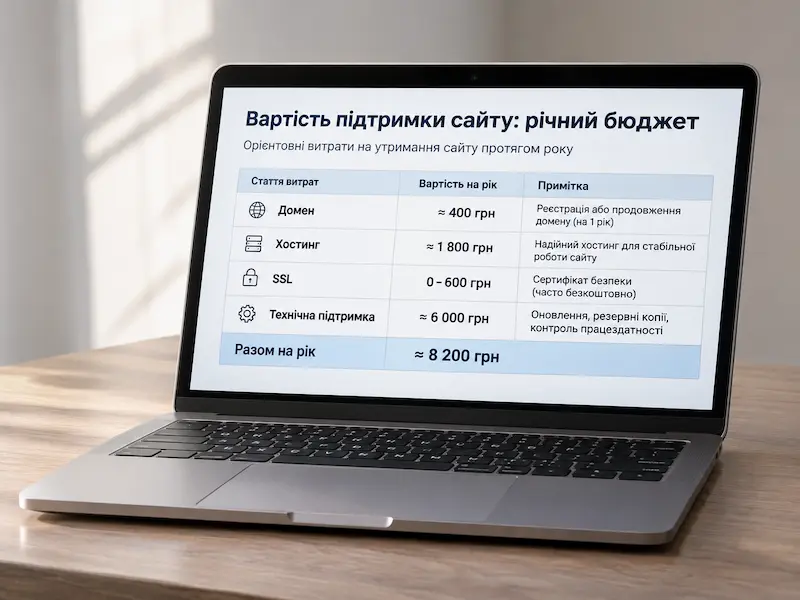
Website development is usually a one-time investment, but keeping a website online involves recurring expenses. Even a business card website with only a few pages and no need for monthly content updates still requires a domain name and somewhere to host its files. Other costs depend on the technology, functionality, and who is responsible for maintaining the website.
A domain name is the website's address on the internet, such as company.com.ua. Domains are registered for a specific period, typically one year, and must then be renewed. In Ukraine, a .com.ua domain may cost approximately UAH 400–800 per year, depending on the registrar. Pay attention to renewal prices, as introductory registration discounts may not apply in subsequent years. Ideally, the domain should be registered in the business owner's name to ensure continued control over the address, regardless of who develops the website.
Hosting is the service that stores website files on a server and makes them accessible to visitors. For a small WordPress website, basic shared hosting typically costs around UAH 1,500–4,500 per year. Websites built with custom code can have different hosting requirements. A small business card website with only a few pages may need very few server resources and can often be hosted on cloud platforms such as Netlify or Cloudflare Pages. As long as it stays within the free plan's limits, including traffic and build usage, it may operate for years without hosting charges. One important detail is that Vercel's free Hobby plan is officially intended for non-commercial use. Commercial projects generally require its paid Pro plan, starting at $20 per month. Always review the platform's terms before launching a business website.
An SSL certificate secures the connection between a visitor's browser and the website. Most traditional hosting providers and the cloud platforms mentioned above provide SSL certificates free of charge, often with automatic renewal. Google Search Console and Google Analytics are also available at no cost.
Technical maintenance does not always require a fixed monthly payment. A website without a content management system, third-party plugins, or complex integrations may operate for extended periods without developer intervention. However, contact forms, contact information, page availability, and connected services should be checked periodically. WordPress websites also require updates to the core system, themes, and plugins, along with compatibility checks and regular backups.
Website development and future improvements are separate expenses. Adding new services, SEO content, location-specific pages, a redesigned interface, or additional functionality is not included in domain and hosting fees. If a company decides to introduce a pricing calculator, customer dashboard, or online booking system, that will usually require additional development work. SEO services and Google advertising are also separate from routine technical maintenance.
To summarize, a business card website built with custom code and hosted on a suitable free plan may have recurring costs limited to its domain name, approximately UAH 400–800 per year. With conventional paid hosting, the combined annual cost of the domain and hosting may be around UAH 2,000–5,500. Paid cloud hosting plans can cost more. These figures are estimates and do not include development, maintenance services, advertising, or future improvements. If you want to know how much it costs to build a website in Ukraine , explore our website development pricing. Before placing an order, ask your developer to provide a clear breakdown of all recurring expenses so you can understand the total cost of owning and operating the website over several years.
Common Website Development Mistakes
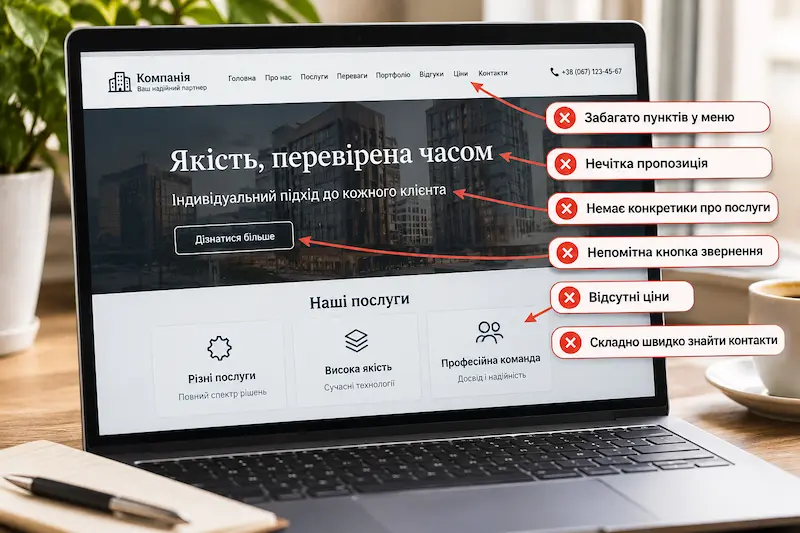
Even a small business card website may fail to generate inquiries if important mistakes are made during development. The problem is not always outdated design or slow loading speed. Sometimes a website looks modern, but visitors cannot understand what the company offers, why they should trust it, or how to order a service. Let's examine the mistakes that most often undermine website usability and customer acquisition.
The first mistake is an unclear offer on the homepage. Headlines such as Quality You Can Trust or Your Reliable Partner tell new visitors very little. People should immediately understand what services the company provides and where it operates. For a cleaning business, a headline like Apartment and Office Cleaning in Kharkiv is far more informative than an abstract promise of exceptional service. Advantages can be explained further down the page, but the company's main activity should be obvious from the first screen.
The second mistake is trying to fit every service onto a single page. When a business has several distinct service areas, a short list is rarely enough. For example, a lawyer cannot thoroughly explain criminal defense and corporate legal support in one small section. These services address different customer needs and search queries. Creating dedicated pages for individual service areas allows businesses to provide specific answers to visitors' questions.
The third mistake is replacing meaningful information with generic marketing claims. Phrases such as Team of Professionals, Personalized Approach, and Best Prices appear on countless websites and do little to help visitors evaluate a company. Concrete details about experience, specialization, equipment, completed projects, and working conditions are far more convincing. If you claim an advantage, explain what supports it.
The fourth mistake is hiding pricing information. Fixed prices are not always possible, but offering no guidance at all forces potential customers to contact the company simply to learn whether a service fits their budget. Provide starting prices, sample calculations, or explanations of the factors affecting the total cost. For services with many variables, an online calculator or estimate request form can be useful. The goal is to avoid making customers feel that pricing is being withheld without a good reason.
The fifth mistake is making it difficult to get in touch. The phone number appears only on the contact page, the inquiry button is hard to notice, or the form asks for too much information. An initial inquiry usually requires only a few fields. If a preliminary estimate is needed, collect only the details the manager genuinely needs. Contact options should be available on all main pages so visitors can reach out whenever they are ready.
The sixth mistake is failing to test the mobile version thoroughly. A website may look excellent on a large monitor but display tiny text, awkward navigation, horizontally scrolling tables, or buttons placed too close together on a smartphone. It is particularly frustrating when a contact form works on a computer but makes it difficult to enter a phone number on mobile. Test responsive layouts at actual device sizes rather than relying solely on design mockups.
The seventh mistake is ignoring SEO during development. If every page uses similar headings, services are described in vague terms, and internal links are missing, Google may struggle to understand the purpose of each page. Excessively repeating keywords does not help either. Every page should have a clear topic, descriptive headings, useful content, and relevant connections to other sections. SEO should be considered when planning the website structure, not only after launch.
The eighth mistake is losing control of the website after delivery. The domain may be registered in the developer's name, hosting access may remain with a third party, or inquiries may be sent to an email account the business owner cannot access. Before the project is completed, obtain all necessary credentials, confirm who owns the domain, and agree on the terms of future support. This is not a design issue but a matter of business independence.
Most of these mistakes can be prevented before development begins by understanding customer needs, planning the website structure, preparing reliable information, and defining what action visitors should take. Once the website is complete, test more than its appearance. Check every important user journey, from finding the right service to successfully submitting an inquiry.
Conclusion
A business card website is more than a few pages with photographs, services, and contact details. It is a tool that helps potential customers understand what your business offers, evaluate its professionalism, and decide whether to get in touch. The quality of a website is therefore determined not by the number of sections or the complexity of its design, but by how clearly it answers visitors' questions.
The examples of a cleaning company, a lawyer, and a barbershop show that there is no universal website structure. A cleaning business benefits from dedicated service pages, clear pricing, and a cost calculator. A lawyer needs to highlight areas of expertise, professional experience, and real case studies. A barbershop should showcase its atmosphere, introduce its barbers, and make appointment booking easy. Every website should reflect the specific needs of the business and the behavior of its customers.
There is no need to start with complex functionality or dozens of pages. It is more important to plan the right structure, prepare accurate information, make it easy for visitors to get in touch, and establish a solid foundation for SEO. A well-designed business card website can gradually grow to include new services, pages, and features without requiring a complete redesign.
Before commissioning a website, define what you want to achieve: more phone calls, inquiries, appointment bookings, or leads from Google. These goals should guide your decisions about website structure, technology, and budget. A business card website delivers the greatest value when it becomes an integral part of your business growth rather than just another address on the internet.