website development stages
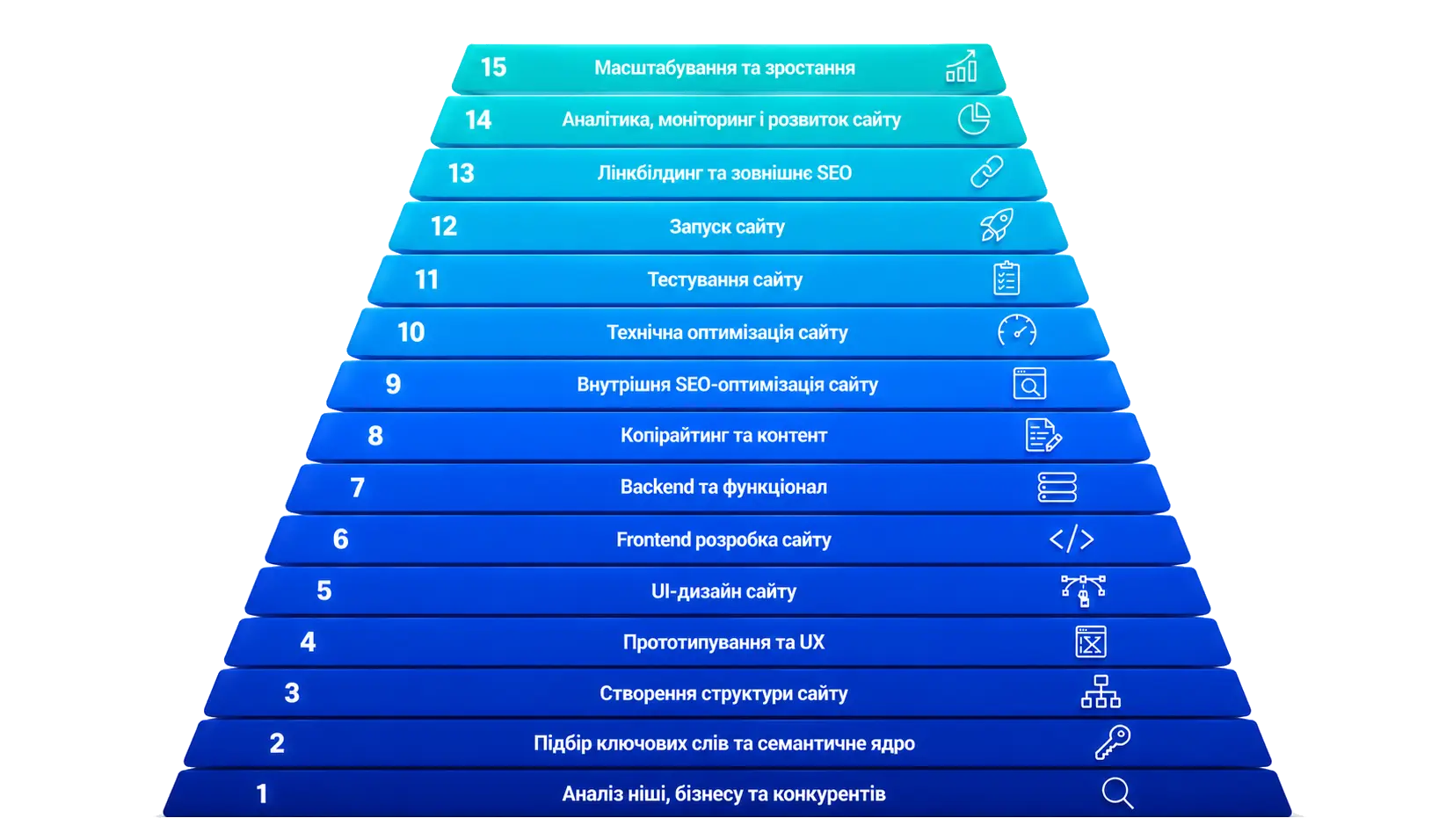
Website Development Stages
Introduction
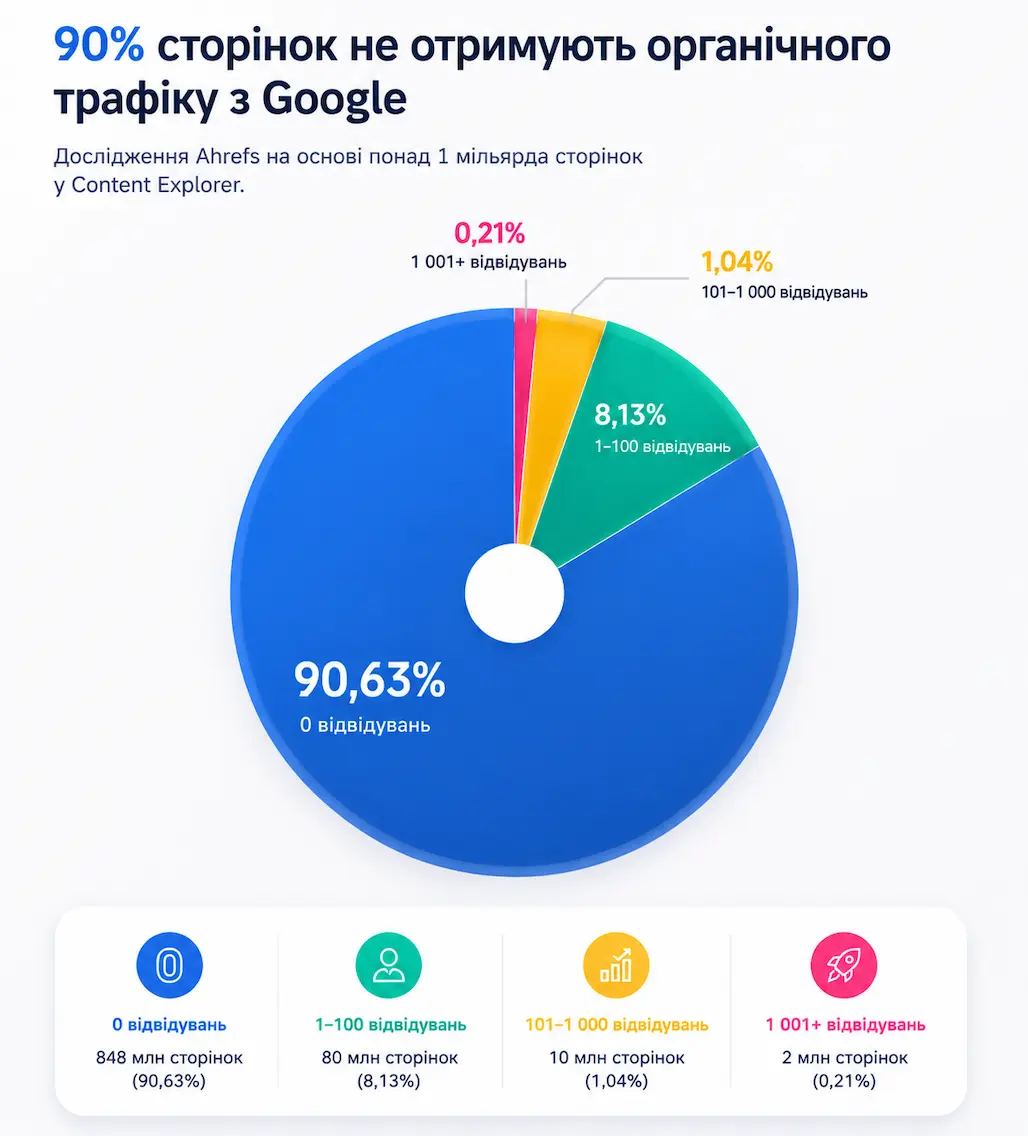
Imagine this: you invested money into a website. Beautiful design, modern animations, everything looks similar to competitors already ranking at the top. A month passes — no leads. Two months — still silence. You open Google and search for your company. Your website is somewhere on the fifth page. Or you cannot find it at all.
Sounds familiar? This is a predictable result when a website is created as a visual showcase rather than a business tool.
A modern website is a system. It either works for the business from day one or simply takes up space on the internet. The difference between these two outcomes is determined long before a developer opens a code editor. Even before a designer creates the first mockup.
Below is an honest breakdown of every stage of website development. No fluff — just practical examples and explanations of why every step matters for the final result.
Niche, Business, and Competitor Analysis
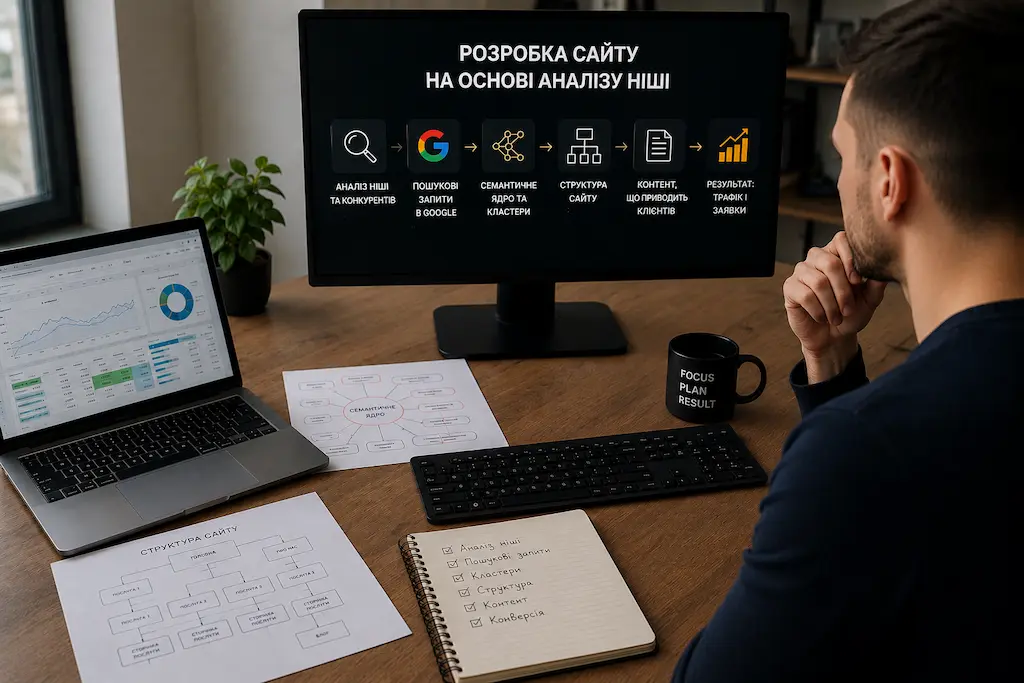
Many projects start directly with design — and this is one of the biggest mistakes in website development. Without analyzing the niche, competitors, and search demand, even an expensive website may fail to generate leads and remain invisible in Google for years.
Website development starts with business research. You need to understand who your target audience is, what problems they are trying to solve, what influences their purchasing decisions, and which factors build trust in your company.
Next comes competitor analysis. Not to copy their design or content, but to understand the structure of their websites, the types of pages they use, how they present services, their SEO strategy, and their weak points. Very often, this stage reveals why some websites consistently receive traffic from Google while others remain practically invisible.
During competitor analysis, we can also see which technologies their websites are built with, how fast they perform, and how their page structure, blog, catalog, forms, and integrations are implemented. This stage often makes it clear why some projects only need a simple solution, while others require a modern and more powerful technology stack from the very beginning.
In competitive niches, this is especially important because simply creating a website is often no longer enough to rank at the top of Google. You need a fast, technically optimized website with strong Core Web Vitals metrics and good PageSpeed Insights scores. But even that is not always enough. When websites in a niche have a similar technical level, content quality becomes the deciding factor: expertise, page structure, usefulness for users, depth of topic coverage, and proper SEO optimization.
Search demand is also analyzed separately. We study what queries people type into Google, which of them are commercial or informational, their search volume, and competition level. Based on this data, the future website structure, categories, service pages, and content plan are created.
This stage determines whether a website will simply be a visually appealing page on the internet or a full-scale tool for attracting customers.
Keyword Research and Semantic Core Creation

This is the stage where many websites lose before they even launch. A common mistake is selecting 5–10 obvious keywords such as “website development Kyiv” or “order a website” and optimizing a single homepage for all of them. At first glance, this seems logical, but in practice, it often does not work.
The reason is that Google evaluates not just the presence of keywords on a page, but how well the page satisfies a specific user intent. And user intents can be completely different: one person searches for “restaurant website development,” while another searches for “how to create a website yourself.” These are entirely different needs.
If different intents are mixed on one page, the page will fail to fully satisfy any of them. That is why we build a complete semantic core: dozens, hundreds, or even thousands of search queries that are later clustered — grouped by topic, user intent, and future website pages.
After clustering, it becomes clear which pages the website actually needs. For example, commercial queries are grouped into service pages, categories, or landing pages, while informational queries are turned into blog articles, guides, and supporting materials. This creates not a chaotic collection of pages, but a logical SEO structure.
We also define the main thematic pages — the core pillars of the website. These pages cover broad and important topics, while related subpages and articles are built around them. For example, a main website development page may link to pages about landing pages, business websites, corporate websites, online stores, and separate articles about development stages, pricing, and SEO.
This approach helps Google better understand the website’s expertise, which topics it covers in depth, and how pages are connected to each other. It is also more convenient for users because they can naturally move from a general topic to a specific solution or answer.
After that, each page receives its primary keyword, additional search terms, future heading structure, content logic, and place within the overall website architecture. In other words, semantics become more than just a list of words — they turn into a clear plan for pages designed to support SEO promotion and customer acquisition.
This is how websites are built to rank in Google not for just one or two keywords, but for dozens or even hundreds of search queries simultaneously.
Website Structure Planning and Technical Specification
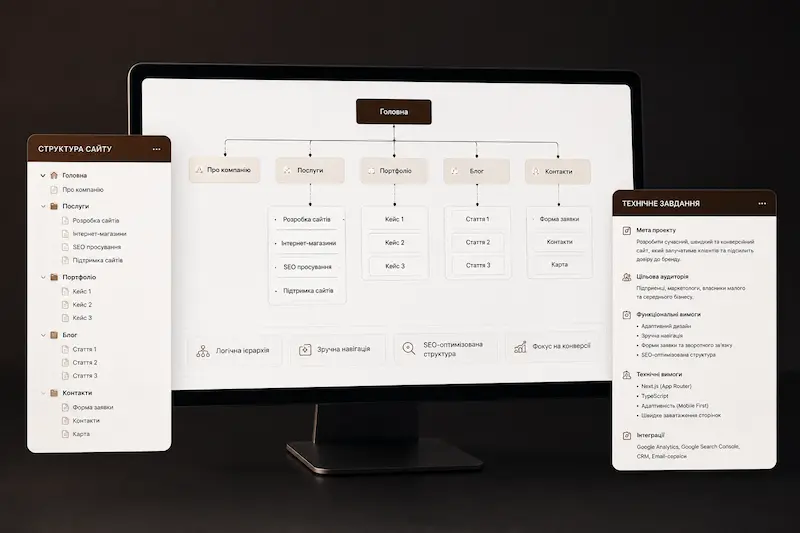
A website structure is like a city plan. You can build beautiful houses, but if the streets are confusing and there is no logic, people will not find where they need to go. As a result, they simply leave for competitors where everything is clear from the first few seconds.
One of the most common mistakes is creating a website without a well-thought-out structure. A typical example is having a homepage, an “About Us” page, a “Services” page, and a “Contacts” page, while all services are placed on a single page. In this case, Google sees only one page for ranking purposes, which limits the website’s ability to target different groups of search queries.
A proper structure works differently. Every important service, category, subcategory, or region has its own dedicated page with a unique URL, heading, content, and keyword set. This allows the website to match user intent more accurately and build SEO around a complete website architecture rather than a single page.
Website navigation is also carefully planned: menus, categories, breadcrumbs, recommendation blocks, and the logic of transitions between pages. A user should be able to quickly move from the homepage to a service page, pricing section, portfolio example, or contact form.
Another critically important element is internal linking. This is the system of links between website pages that helps Google understand the structure of the project, identify the most important pages, and properly distribute SEO authority. A website without strong internal linking is like a group of islands without bridges connecting them.
This is also the stage where the technical specification is created — a document that describes the website structure, functionality, page logic, design concept, SEO requirements, and future integrations in detail. The technical specification helps define what the website should look like, what tasks it must solve, and how users should move from the first visit to submitting a request before design and development even begin. Corporate website development almost always requires this kind of document because, without it, a complex project quickly turns into a chaotic collection of revisions.
The technical specification also defines requirements for the future technical implementation: whether the project needs a CMS, blog, catalog, filters, user accounts, multilingual support, CRM integrations, payment systems, or analytics services. At this point, it becomes clear which technology stack is the best choice: a simple solution for a small website, WordPress for projects requiring a traditional admin panel, or a modern Next.js stack for a fast, scalable, and SEO-oriented website.
A sitemap is also created separately — a structure of all pages and the relationships between them. This is not just a scheme, but the foundation for future navigation, SEO growth, and scaling. At this stage, it becomes clear how the website will evolve in the future: whether new services, regions, articles, categories, or landing pages can be added without completely rebuilding the project.
That is why website structure planning and technical specification are created before design. First comes the page logic, SEO architecture, sitemap, functional requirements, and technical foundation of the project — only then come the design, content, and development stages.
Website Prototyping
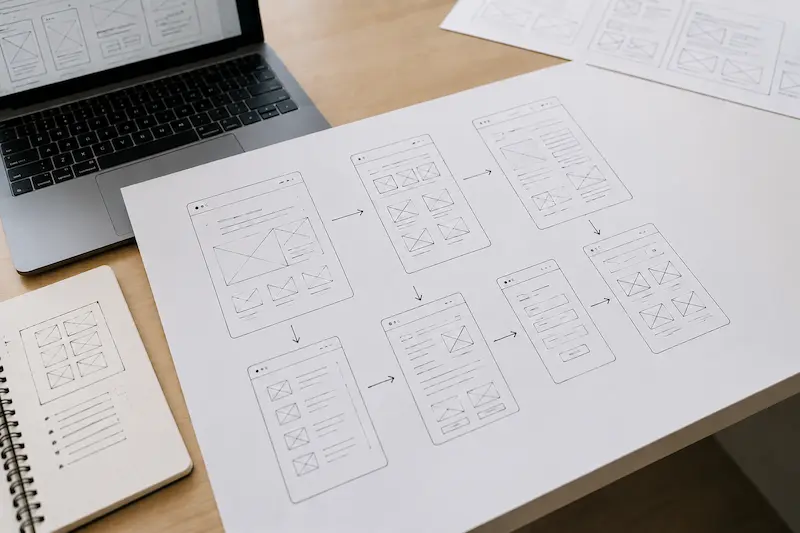
A prototype is the framework of a future website. No colors, no visual design — only logic. Where the heading is placed, where the button is located, where the form appears, and how the user moves from the first screen to the final action.
At first glance, it may seem possible to skip this step and move directly to design. But this is exactly where the foundation is created for whether the website will convert visitors into customers — or fail to do so. If a person visits a website and does not understand what to do next, no advertising campaign will save the situation.
During the prototyping stage, the structure of every page is defined: the hero section, headings, benefits, case studies, forms, FAQs, and calls to action. This is not about visual appearance — it is about usability and logic. Whether it is immediately clear what is being offered. Whether users can quickly find the information they need. Whether the page guides them toward a conversion or loses them along the way.
The user flow is also carefully planned — the literal path a customer takes through the website. A visitor lands on a page, sees the main offer, reviews the benefits, explores case studies or examples, reads answers to common questions, and clicks a button. Each block logically leads to the next one. If this chain breaks, the user simply leaves the website.
Prototyping also helps avoid expensive revisions during later stages. Business website development requires this step just as much as more complex projects because even a small website needs a clear structure, logical content blocks, and a user journey that leads toward conversion. When the structure is approved before design begins, the designer understands what should be emphasized visually, the copywriter understands what content is needed in each section, and the developer understands which logic must be implemented.
The mobile version of the website is also planned separately at this stage. Today, a large percentage of traffic comes from smartphones, so buttons, menus, forms, and key sections must already be convenient for users before a designer even opens Figma and starts creating the final layout.
Very often, the prototyping stage is also where a mood board is created — a collection of references, color palettes, fonts, and visual styles. This helps align expectations between the client and the team before the design phase begins. It is much cheaper to change a reference at the beginning than to completely redesign finished layouts later.
In reality, prototyping is a way to test the future website for logic, usability, and common sense. This is where future conversion rates, user behavior, and the overall effectiveness of the website are truly determined.
Website UI Design
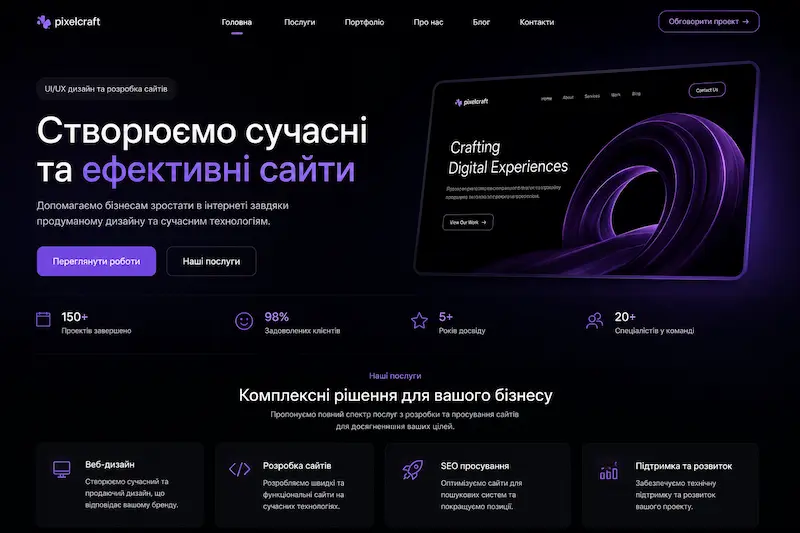
There is a common misconception that good design is simply design the business owner personally likes. In reality, design should not serve personal taste — it should serve the target audience, the purpose of the website, and the actions users are expected to take.
This becomes especially noticeable in landing pages, where there is only one page and the design must immediately capture attention and guide the visitor toward a conversion. During landing page development a strong UI design helps users instantly understand where they are, what is being offered, and what they should do next.
For an accounting company, a restrained dark-blue design without unnecessary decorative elements may work best because clients expect seriousness, stability, and trust. For a children’s center, a warm and colorful visual style with soft colors and illustrations is usually more effective. For an architectural studio, minimalism, white space, and large project images immediately demonstrate the quality of work.
Typography is not just about choosing a beautiful font. It is about information hierarchy. A large heading captures attention, a subheading explains the idea, a paragraph provides details, and a button guides users toward the next action. If this hierarchy is broken, visitors become confused and no longer understand where to focus first.
Colors, spacing, element sizes, contrast, button shapes, and visual accents must also work together systematically. If everything on the page is equally bright and attention-grabbing, users will not notice what actually matters. If an important button gets lost among blocks of text, some visitors will never reach the conversion stage.
Responsive design is not just about making sure the website does not break on mobile devices. It is a separate design logic for different screen sizes where content, buttons, menus, forms, and important sections are positioned according to user behavior. People interact with websites differently on smartphones and desktop computers, so the design decisions should also be different.
As a result, UI design should not simply look modern — it should help the website achieve business goals: keeping attention, explaining the offer, building trust, and guiding users toward the desired action.
Frontend Website Development
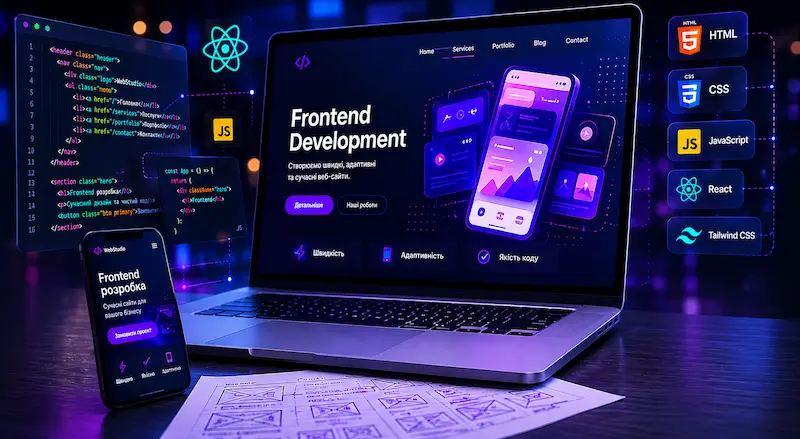
Frontend development is the stage where design comes to life inside the browser. The developer takes the finished layout and transforms it into code: page structure, styles, responsiveness, animations, interactive elements, forms, and user interaction logic.
But there is a huge difference between code that simply works and code that works quickly, cleanly, and correctly from an SEO perspective. A website may look visually impressive, but if it loads slowly, stutters during scrolling, or contains technical issues, some users will leave before submitting a request.
One common problem is a bloated DOM. This happens when the page contains too many unnecessary elements, wrappers, and nested structures that the browser has to process. As a result, the page performs more slowly, and users experience it as lagging or sluggish behavior.
Another issue is unoptimized CSS. If large amounts of styles are loaded onto a page while most of them are never actually used, the website becomes heavier and slower during the initial load. Good frontend development includes a clean style architecture, responsiveness, and the absence of unnecessary code.
JavaScript can also either help or harm performance. If scripts block rendering, the browser must first download and process the code before displaying the page to the user. During this time, visitors may see a blank screen or wait longer than they are willing to tolerate. That is why interactivity should be carefully considered instead of being added unnecessarily.
Good frontend development is a balance between visual quality and performance. Animations are used where they improve the user experience instead of overloading the page. Code is written in a way that keeps the website fast, responsive, accessible for users, and understandable for search engines.
As a result, frontend development affects not only how a website looks, but also how quickly it works, how convenient it is to use on mobile devices, how well Google can understand it, and whether the business loses potential customers because of technical issues.
Backend Development and Website Functionality
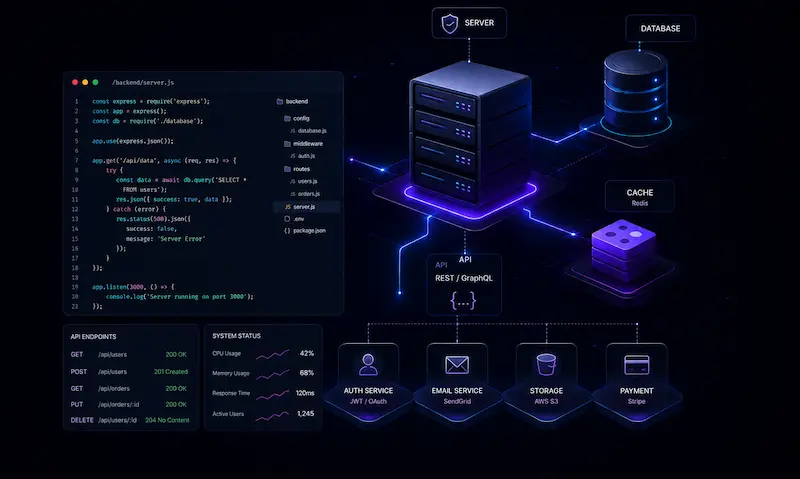
If frontend is what users see on the screen, backend is everything that happens after their actions. A person clicks a button, submits a form, adds a product to the cart, signs in, or places an order — and the backend is responsible for processing all of these actions.
For example, when a user clicks “Order Now,” the form must be correctly sent to email or CRM software. If a product is selected, it should be added to the cart and stored by the system. When a user signs in, the website should display personal data, order history, or access to a user dashboard.
The amount of backend development depends on the type of website. A simple landing page often only requires a contact form and basic integration with email or lead processing services. For an online store, backend development becomes one of the core parts of the project because it must handle products, shopping carts, orders, payments, delivery systems, user accounts, and the administrative panel.
Another important topic is the CMS — a content management system. This is the admin panel that allows business owners to independently update text, add products, publish news, edit pages, or manage a blog without constantly relying on a developer.
However, not every website actually needs a CMS. If it is a small landing page or a business website that rarely changes, a full CMS can unnecessarily complicate the project, add extra code, and reduce website performance. In such cases, a lighter solution without a large administrative system is often more practical and efficient.
For a blog, catalog website , online store, or any website with regularly updated content, a CMS becomes essential. It allows businesses to manage content, products, categories, and publications quickly without depending on a developer for every small update.
A good backend is not just a collection of features — it is the stable logic behind the website. It should be secure, easy to manage, scalable for future growth, and should not overload the project where a complex system is unnecessary.
Content and Website SEO Structure
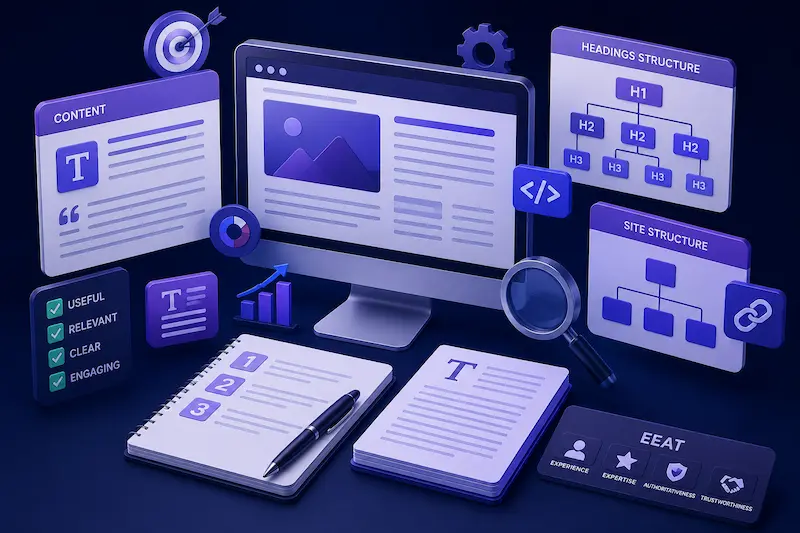
Content is one of the most important stages of website development, yet it is very often postponed until the last moment. The design is finished, development is complete, the functionality works — but the texts are left “for later.” As a result, the website gets filled with generic phrases like “we are a dynamic company with many years of experience,” which explain nothing to either users or Google.
The problem is that modern SEO is no longer just about inserting keywords into text. Google analyzes how well a page actually answers the user’s query. If someone searches for how much it costs to build a website , they expect to see real information: types of solutions, pricing factors, estimated budgets, examples, and explanations. If the page only contains generic marketing phrases, users simply leave and move to a competitor.
Good content is not text written just to fill space. It is content that clearly answers user questions, helps people make decisions, and removes doubts. That is why during the content creation stage, not only the texts themselves are planned, but also the logic of presenting information, the page structure, the order of content blocks, and the connections between them.
Heading structure also plays a separate role. H1, H2, and H3 are not simply visual formatting or different font sizes. For search engines, they are signals that help explain the topic and structure of a page. The H1 defines the main topic of the page, H2 headings cover subtopics and additional search intents, while H3 headings help structure larger content sections in more detail.
A proper heading hierarchy makes the page easier to understand for both users and Google. Visitors can quickly find the information they need, while search engines better understand how deeply the topic is covered. That is why the SEO structure should be planned before writing content, not after the website is launched.
Today, Google also actively evaluates content quality through the EEAT concept — Experience, Expertise, Authoritativeness, and Trustworthiness. Because of the massive amount of template-based and AI-generated content online, search engines increasingly favor websites that demonstrate real expertise and practical experience.
That is why generic statements are no longer enough. Real case studies, numbers, examples, results, simple explanations of complex processes, and answers to genuine user questions work far better. For example, actual project results, launch timelines, real examples of completed work, or explanations of how the website development process is built step by step.
Content also directly impacts long-term SEO growth. Articles, landing pages, case studies, FAQs, and thematic materials allow websites to rank for hundreds of search queries, build topical authority, and gradually strengthen positions in Google.
In reality, content is not just an addition to a website — it is one of its foundations. Even a technically perfect website with excellent design will struggle to consistently attract organic traffic and leads without strong, structured, and genuinely useful content.
On-Page SEO Optimization
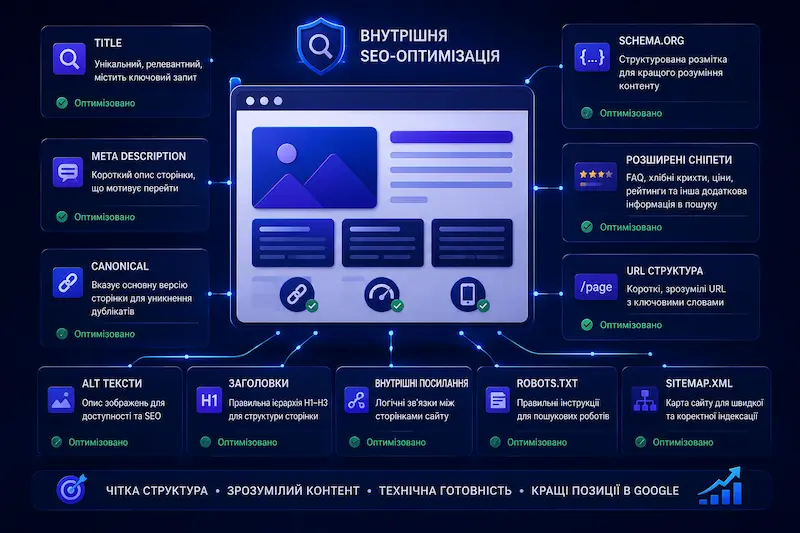
You can write strong content, create a modern design, and build a fast website, but if on-page SEO optimization is configured incorrectly, Google may fail to fully understand the page or misinterpret its main topic.
The title tag is the page headline shown in search results. It is not the same as the H1 visible on the page itself — it is a separate SEO element. A good title should contain the main target keyword, clearly describe the page content, and encourage users to click your result instead of a competitor’s.
The meta description is the short text displayed below the title in search results. Google may sometimes generate its own snippet, but a well-written description can improve click-through rate, explain the page value, and make the result more noticeable.
The canonical tag is used to prevent duplicate content issues. If the same page is accessible through multiple URLs, Google may treat them as duplicate or competing pages without a properly configured canonical tag. This weakens SEO signals and can negatively affect rankings.
Schema.org is structured data markup that helps search engines better understand the page content: what type of page it is, which service it describes, which company provides it, whether there are FAQs, prices, reviews, or other important details.
Rich snippets are a possible result of correctly implemented structured data. Thanks to Schema.org markup, search results may display FAQs, breadcrumbs, prices, ratings, or additional information about a service or organization.
On-page SEO optimization also includes a proper URL structure, alt text for images, optimized headings, logical page hierarchy, internal linking, robots.txt, sitemap.xml, and basic technical preparation for indexing.
This is the stage that transforms a page from a visually attractive layout into a document Google can clearly understand. Search engines need to recognize what the page is about, which topic it covers, which elements are important, and how it connects to other pages on the website.
When on-page SEO optimization is done correctly, the website gains a stronger foundation for indexing, higher click-through rates in search results, and better long-term ranking potential for important search queries.
Technical Website Optimization
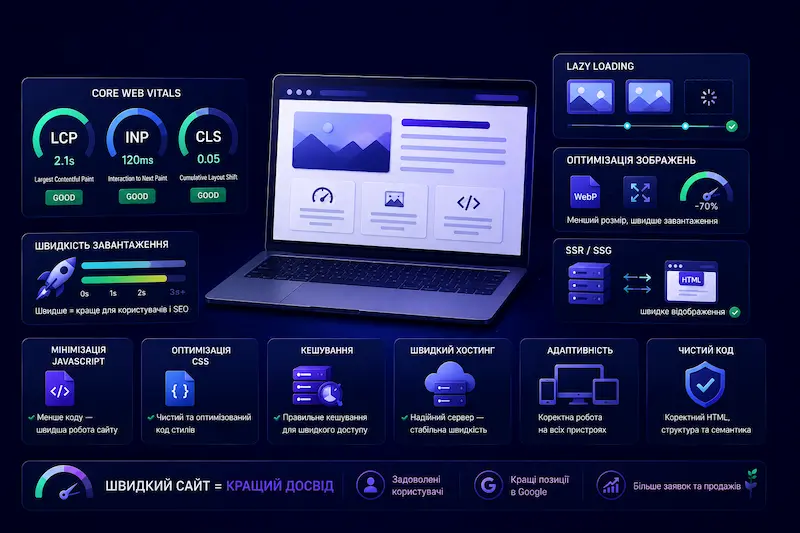
Technical website optimization is the stage that directly affects loading speed, usability, and how search engines evaluate a website. Google officially includes Core Web Vitals as part of its page quality assessment, which means website speed and stability are no longer optional — they are critical requirements for competitive SEO.
Core Web Vitals consist of three main metrics: LCP, INP, and CLS. LCP measures how quickly the largest visible element on a page loads. INP evaluates how fast the website responds to user interactions. CLS measures layout stability and helps determine whether elements unexpectedly shift during loading.
If a website fails these metrics, it can lose rankings to competitors with faster and technically stronger pages. This becomes especially noticeable in competitive niches where high-quality content already exists on almost every website, making technical performance an additional competitive advantage.
Lazy loading allows images to load only when users scroll close to them instead of loading everything at once. This significantly improves the initial loading speed, especially on websites with many images, product cards, galleries, or visual sections.
Image optimization also plays a major role. Modern formats, correct dimensions, compression without visible quality loss, and proper use of width and height attributes help reduce page weight and prevent layout shifts during loading.
SSR and SSG are rendering approaches where pages are generated in advance or on the server and delivered to the browser already prepared for fast rendering. This is important for SEO because search engines receive understandable HTML content faster, while users do not have to wait for the page to be fully generated in the browser from scratch.
Technical optimization also includes minimizing unnecessary JavaScript, optimizing CSS, proper caching, fast hosting, clean code, responsiveness, and ensuring stable website performance across different devices.
As a result, technical optimization makes a website not only faster, but also more competitive. Users see content more quickly, Google evaluates the page more positively, and businesses have a better chance of retaining visitors and converting them into leads.
Website Testing
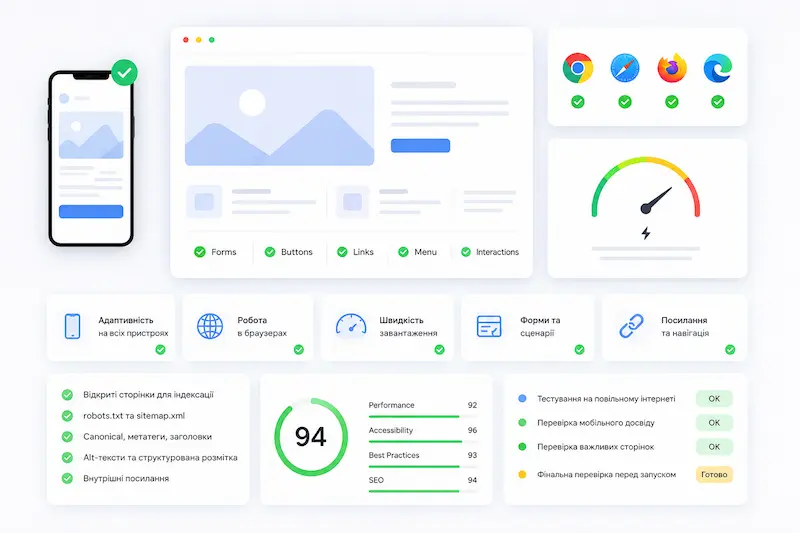
Launching a website without testing is like opening a restaurant without tasting a single dish from the menu. At first glance, everything may appear ready, but real problems often become visible only after testing the website on different devices, browsers, and internet speeds.
For example, a button may go beyond the screen on an iPhone, a form may fail to submit in Safari, the main banner may load too slowly on a weak mobile connection, or an important page may accidentally remain blocked from indexing after the testing environment.
Every such mistake after launch is not just a minor technical issue. It means lost leads, damaged first impressions, unnecessary post-release fixes, and reputational risks for the business.
That is why, before launch, the website is tested for responsiveness, browser compatibility, loading speed, functionality of forms, buttons, links, menus, interactive elements, and complete user scenarios.
A separate technical SEO audit is also performed: checking whether the required pages are open for indexing, whether robots.txt and sitemap.xml work correctly, and whether canonical tags, meta tags, headings, alt texts, structured data, and internal links are configured properly.
It is also important to run a Lighthouse audit to evaluate performance, accessibility, SEO, and the overall quality of the pages. This helps identify technical problems before real users visit the website and before the first issues begin affecting conversions.
Final testing ensures that the website launches not just looking complete, but actually being stable, fast, user-friendly, and technically prepared for indexing, advertising campaigns, and real customer inquiries.
Website Launch
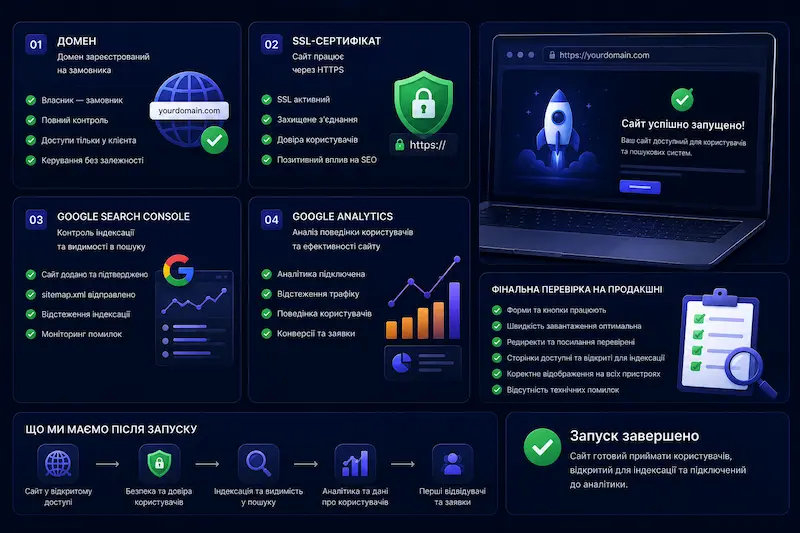
Website launch is the moment when the entire project becomes publicly available for users and search engines. But this is not just about “pressing a button.” At this stage, it is important to properly prepare the domain, hosting, security, analytics, indexing, and final technical checks.
The domain should always be registered in the client’s name, not under the agency or developer. The business owner must have full control over the domain, access credentials, and the ability to manage the website independently in the future without relying on third parties.
An SSL certificate is mandatory. Without HTTPS, browsers may display warnings about an unsafe website, and users often leave such pages before even viewing the content. In addition, a secure connection is important for trust, SEO, and the proper functioning of forms.
After launch, Google Search Console is connected to monitor page indexing, technical issues, sitemap.xml, search visibility, and the search queries through which users find the website.
Google Analytics helps understand where users come from, which pages they visit, how they behave on the website, and at which stage they leave without submitting a request. Without analytics, it is impossible to properly evaluate website performance after launch.
After deployment, the website must be tested again in the live production environment. Sometimes a website behaves differently on a live server compared to a staging version: issues with forms, performance, indexing, redirects, or page accessibility may appear.
That is why launching a website is not the final step, but a controlled technical process. Its goal is to ensure that the website is accessible, secure, open for indexing, connected to analytics tools, and fully ready to receive its first visitors and leads.
Link Building and Off-Page SEO
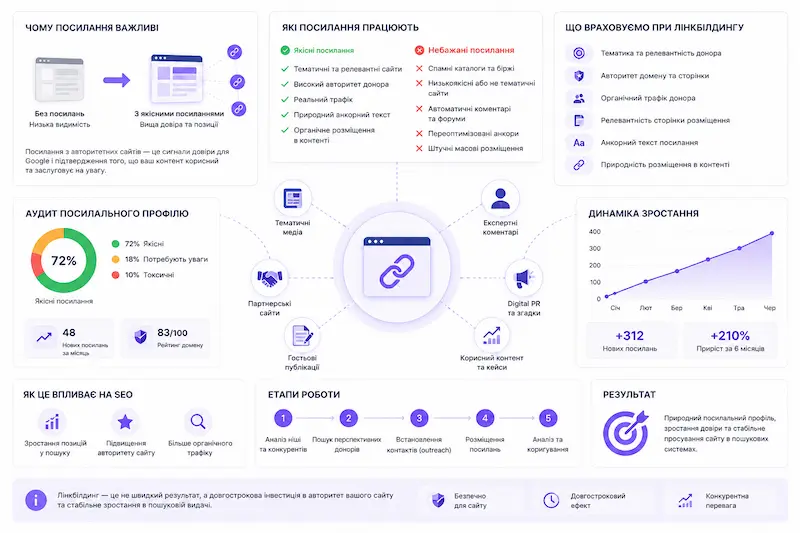
Link building and off-page SEO are the stages that help strengthen a website’s authority beyond its own pages. Imagine two equally skilled specialists: one does excellent work, but nobody knows about them, while the other is quoted in articles, mentioned in professional publications, and recommended by colleagues. Naturally, people trust the second one more.
Google works in a very similar way. Links from other websites are treated as trust signals. If reputable and relevant websites link to a project, it becomes easier for search engines to understand that the website has authority within its niche.
However, it is important to understand that not all links are equally valuable. Links from spammy directories, automated link exchanges, or low-quality websites may provide no benefit and can sometimes even harm a domain’s reputation. In contrast, mentions from niche media, industry portals, partner websites, expert articles, or real case studies are significantly more effective.
Quality link building is not about mass-buying random backlinks. It is about gradually building a natural backlink profile. Important factors include the relevance of the referring website, its quality, traffic, page relevance, anchor text, and how naturally the link fits within the content.
Another important part of off-page SEO is outreach. This is the process of earning backlinks through partnerships, guest posts, expert commentary, collaborations, digital PR, or useful content that other websites genuinely want to reference. This approach takes more time, but it creates long-term value.
In competitive niches, strong content and technical optimization alone are often not enough. When several websites already have high-quality pages, fast performance, and a solid structure, external signals can become one of the factors that help a website rank higher in search results. You can read more about website SEO pricing in a separate section.
That is why link building should not be viewed as a one-time action after launch. It is part of a long-term SEO strategy that helps a website build trust, strengthen rankings, and gradually compete with more authoritative domains.
Website Analytics, Monitoring, and Growth
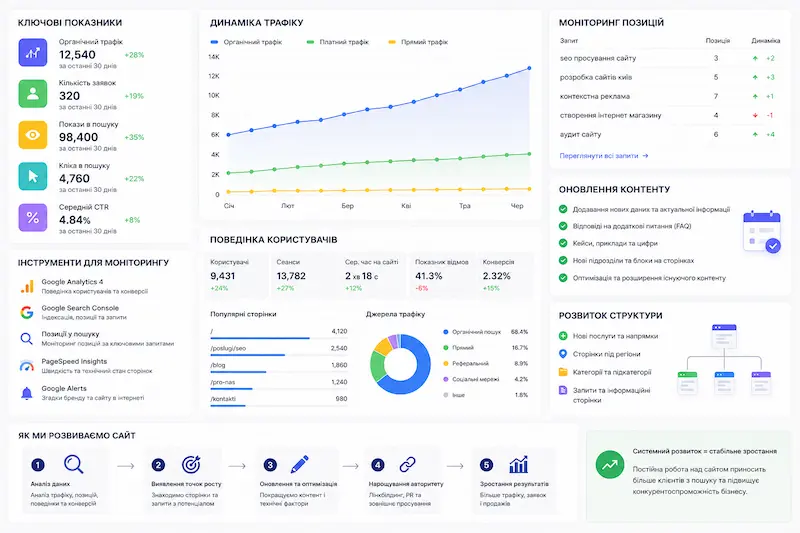
Launching a website is not the finish line — it is only the beginning of its real work. Once a website enters Google’s index, the most important stage begins: monitoring rankings, user behavior, leads, technical condition, and how the website gradually gains or loses visibility in search results.
A website that reaches the top positions once and then remains unchanged may slowly start losing rankings over time. Competitors improve their pages, publish new content, optimize speed, build backlinks, while Google constantly updates its algorithms and becomes better at understanding new search intents.
Regular ranking monitoring shows which search queries are growing, which positions remain stable, and where performance starts declining. This helps identify problems early instead of waiting for a sudden traffic drop, making it possible to update, strengthen, or expand the right pages in time.
User behavior analytics through Google Analytics, Search Console, and other tools show how people interact with the website: where they come from, which pages they view, where they spend time, where they leave, and at which stage they fail to convert. This provides direct insights into what exactly needs improvement.
Content updates are not just rewriting text for the sake of rewriting. They involve adding new information, answering additional questions, including updated examples, case studies, statistics, FAQ sections, and expanding content to cover search intents that were not fully addressed before.
When a page is regularly updated and remains relevant, it better matches user expectations and has a stronger chance of maintaining rankings. For Google, this is a signal that the website is active, continuously improving, and still providing valuable information.
Another important direction of growth is expanding the website structure. This includes creating new pages for additional services, regions, categories, customer types, or informational search queries. Every such page becomes a new entry point from search engines for potential customers.
That is why website growth after launch should be systematic. Analytics show what is happening right now, monitoring helps respond to changes in time, and regular updates together with structure expansion gradually strengthen the website in search results.
Conclusion
If you have read this far, you already understand more about website development than 90% of business owners who simply order “a website with a nice design.”
A website that generates customers is the result of consistent work at every stage. Skip the analysis stage — and the website may remain invisible in search results. Create a poor user experience — and traffic will come without conversions. Launch a website without proper technical optimization — and Google may rank you below a competitor with a worse design but better code.
SEO must be planned before the design stage because a poorly built structure is expensive and difficult to rebuild later. A properly structured website, on the other hand, can work effectively for years without major changes.
Turnkey Website Development with all essential components included is not an expense. It is an investment that pays off every time a new customer finds your business in Google and submits a request.